
Download Roast My Desk – AI Desk Roast Generator, Free & Secure
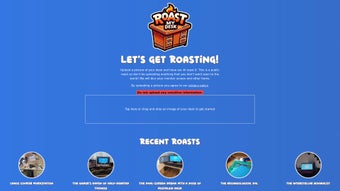
Roast My Desk is a light‑hearted, web‑based AI tool that turns ordinary desk photos into comedy gold. By simply uploading an image of your workstation, the platform’s clever algorithm delivers a witty, personalized roast that pokes fun at clutter, décor choices, and the overall vibe of your space. The service is built for anyone who wants a quick laugh during a break, an ice‑breaker for remote meetings, or a playful way to share the quirks of their home office with friends and colleagues. What sets Roast My Desk apart is its focus on privacy – any personally identifiable objects are automatically blurred before processing – and a community hub that showcases the most popular and recent roasts, encouraging users to engage, up‑vote, and even remix the jokes. Whether you’re a seasoned remote worker, a student battling a messy dorm desk, or just someone who enjoys a good meme, Roast My Desk offers a free, secure, and instantly entertaining experience that adds a splash of humor to the daily grind.
Key Features That Make Roast My Desk Stand Out
- AI‑Powered Humor Engine: Utilises a large language model fine‑tuned on comedic patterns to generate original roasts tailored to the visual elements it detects.
- Instant Results: Roasts are generated in under ten seconds, keeping the experience fast and frictionless.
- Privacy‑First Design: Built‑in image analysis automatically blurs faces, logos, and any personal identifiers before the AI sees the picture.
- Community Gallery: A live feed of trending and recent roasts lets users browse, like, and share the funniest content.
- Customizable Tone: Choose between “Gentle Tease,” “Savage Roast,” or “Office‑Friendly” to match your humor style.
- Cross‑Platform Accessibility: Works on any modern browser – no download required, making it perfect for Windows, macOS, Linux, Android, and iOS users alike.
- Shareable Output: Export the roast as a text snippet, image overlay, or direct social‑media link with one click.
- Free Core Features: All core functionalities are free; premium options (like high‑resolution image export) are available via a modest subscription.
How to Install, Set Up, and Use Roast My Desk
Getting started with Roast My Desk is intentionally simple, because the tool’s primary goal is to deliver humor without technical hurdles. First, navigate to roastmydesk.com using any up‑to‑date browser (Chrome, Firefox, Safari, Edge). No download or installation is required; the service runs entirely in the cloud. On the homepage, click the bright “Upload Your Desk” button and select a JPEG or PNG file from your computer, tablet, or phone. The platform accepts images up to 5 MB, which is more than sufficient for most desk photos.
Once the image is uploaded, the AI begins scanning for recognizable objects—stacks of paperwork, coffee mugs, plant life, gaming peripherals, etc. Simultaneously, the privacy filter blurs any faces or brand logos to protect your identity. After a brief processing period (usually under ten seconds), a roast appears in a stylized text box. You can instantly copy the text, download a graphic version that overlays the roast onto your desk photo, or share it directly to Twitter, Facebook, or Discord using the built‑in share icons.
If you wish to tweak the tone, click the “Tone Settings” dropdown before uploading and pick your preferred level of sass. For frequent users, creating a free account unlocks a personal “Roast History” page where past roasts are stored for future reference. The account also allows you to save favorite roasts, vote on community submissions, and receive email notifications when new features roll out.
System Compatibility
Roast My Desk is a pure web application, meaning it runs on any operating system that supports modern browsers. Whether you’re on Windows 10/11, macOS Ventura, a Linux distribution with Firefox or Chrome, an Android phone, or an iPhone/iPad running iOS 15 or later, the experience is identical. Because the heavy lifting happens on the server side, there’s no need for powerful local hardware—just a stable internet connection. The responsive design automatically adjusts to different screen sizes, ensuring a smooth experience whether you’re using a desktop monitor, a laptop, or a mobile device.
Pros and Cons – Quick Verdict
Pros
- Free core functionality with no hidden fees.
- Fast, AI‑generated roasts that feel genuinely personalized.
- Privacy‑first approach automatically blurs sensitive details.
- Works on any device with a modern browser – no installation needed.
- Community gallery adds a social, competitive element.
- Multiple tone options let you control the level of sarcasm.
- Easy sharing to social platforms with one‑click export.
Cons
- Premium features (high‑resolution export, ad‑free experience) require a subscription.
- Humor is AI‑generated, so occasional roasts may miss the mark or feel generic.
- Image size limit of 5 MB may require compression for very high‑resolution photos.
- Reliant on an internet connection; offline use is not possible.
- Community moderation is user‑driven, so occasional low‑quality roasts appear in the gallery.
Roast My Desk delivers a fresh blend of AI humor and user privacy, making it a delightful break‑time tool for anyone with a desk to brag—or roast—about. Its speed, cross‑platform nature, and community features outweigh the minor limitations of premium content and occasional generic jokes.
Frequently Asked Questions
Is Roast My Desk really free?
Yes, the core features—including unlimited uploads, AI‑generated roasts, and sharing options—are completely free. A paid subscription only unlocks premium extras such as high‑resolution image exports and an ad‑free experience.
Do I need to create an account to use the tool?
No, you can generate roasts anonymously without an account. Creating a free account simply provides a personal roast history, the ability to vote on community posts, and optional email updates.
How does Roast My Desk protect my privacy?
The platform automatically detects faces, logos, and other personally identifiable items in the uploaded image and blurs them before the AI processes the picture. No raw images are stored permanently on the server; they are deleted after the roast is generated.
Can I adjust the level of sarcasm in the roast?
Absolutely. Before uploading, you can choose from “Gentle Tease,” “Savage Roast,” or “Office‑Friendly” in the tone selector. Each setting tailors the AI’s language style to match your preferred level of humor.
What browsers are supported?
Roast My Desk works on all major browsers that support modern JavaScript and HTML5, including Chrome, Firefox, Safari, Edge, and Opera. The service is fully responsive on mobile browsers as well.
Conclusion – Should You Download Roast My Desk?
If you’re looking for a quick, free, and privacy‑conscious way to inject some humor into your workday, Roast My Desk is an excellent choice. Its AI‑driven roasts are fast, surprisingly witty, and can be customized to suit any office culture. Because it runs entirely in the browser, there’s no heavy installation process, and it’s compatible with Windows, macOS, Linux, Android, and iOS.
While premium features are optional, the free tier already provides everything you need for endless laughs and social sharing. Give it a try—upload a photo of your own desk and let the AI deliver a roast that might just become the highlight of your next Zoom call. Download Roast My Desk today and start turning clutter into comedy!



.png)



